Artificial intelligence is becoming less about generating answers and more about actually helping businesses get work done.
Most people still use AI the same way. They ask a question, copy the answer, and paste it somewhere else. While that can save time, it still requires manual effort.
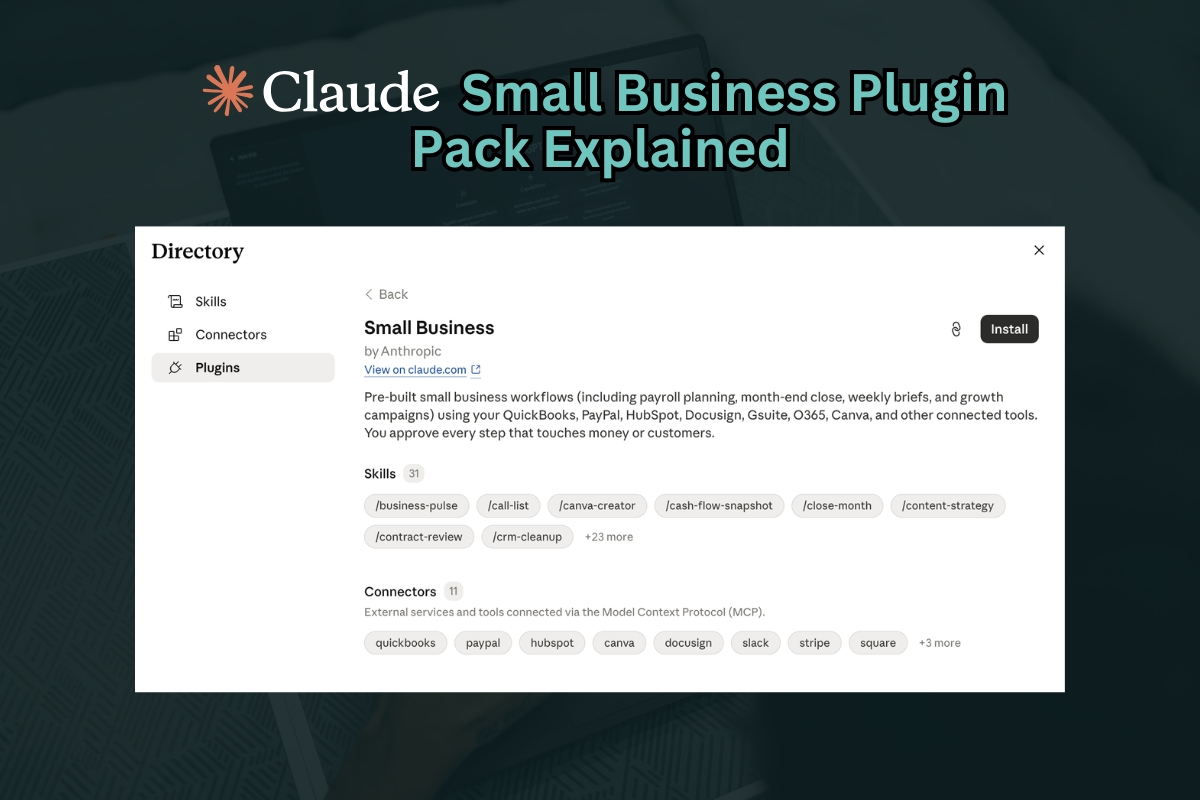
Claude’s Small Business Plugin Pack takes things further.
Instead of simply generating text, it connects to the business tools you already use and helps complete actual business tasks. Whether that means reviewing invoices, planning payroll, creating marketing content, or summarizing business performance, the idea is to turn AI into a working assistant rather than just another chatbot.
For small business owners looking for an easy entry point into AI, this plugin pack offers a practical place to start.
What Is Claude’s Small Business Plugin Pack?
Claude’s Small Business Plugin Pack is a prebuilt collection of AI workflows created to help small businesses automate common operational tasks.
Rather than building custom automations from scratch, business owners install the plugin and gain access to ready made workflows that connect with existing business software.
The plugin includes 31 prebuilt workflows, often referred to as skills.
These workflows can work with tools such as:
- QuickBooks
- PayPal
- Canva
- DocuSign
- Slack
- Stripe
- Gmail
- Google Calendar
- Microsoft tools
Because these integrations already exist, setup is much faster compared to traditional automation platforms.
Think of it as getting a business operations assistant that already understands the tools you use every day.
Understanding Plugins, Skills, and Connectors
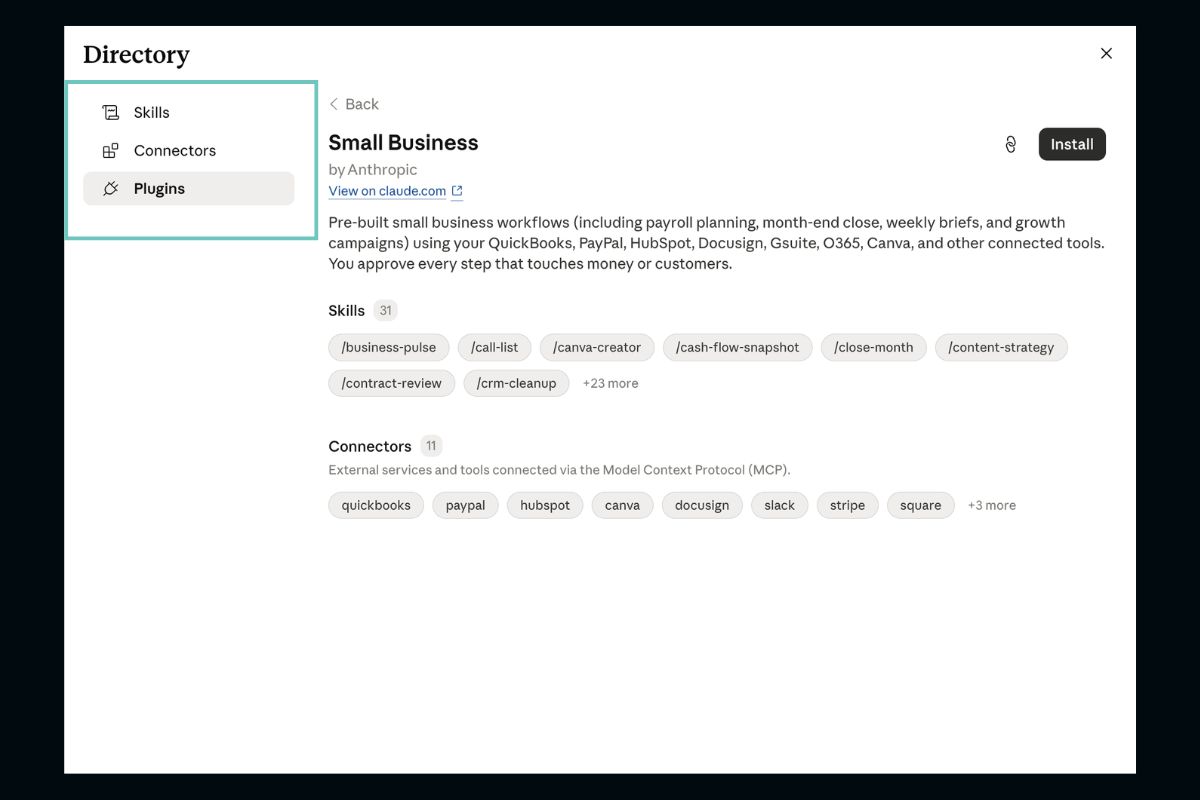
Before using the platform, it helps to understand three terms.
Plugin
A plugin is a complete package of workflows grouped together.
For example, the Small Business Plugin contains multiple business related automations inside one installation.
Skill
A skill is a single repeatable workflow.
Skills are launched using slash commands and perform specific tasks.
Examples include:
- Creating a business summary
- Following up on unpaid invoices
- Planning payroll
- Generating hiring documents
- Building marketing campaigns
Connector
A connector links Claude to your existing software.
Connectors allow Claude to access approved business data and generate useful outputs.
Examples include:
- Connecting QuickBooks for financial reporting
- Connecting Slack for team updates
- Connecting Gmail for communication history
- Connecting Canva for marketing creation
The stronger your connected ecosystem becomes, the more useful the outputs become.
How to Set Up Claude for Small Business
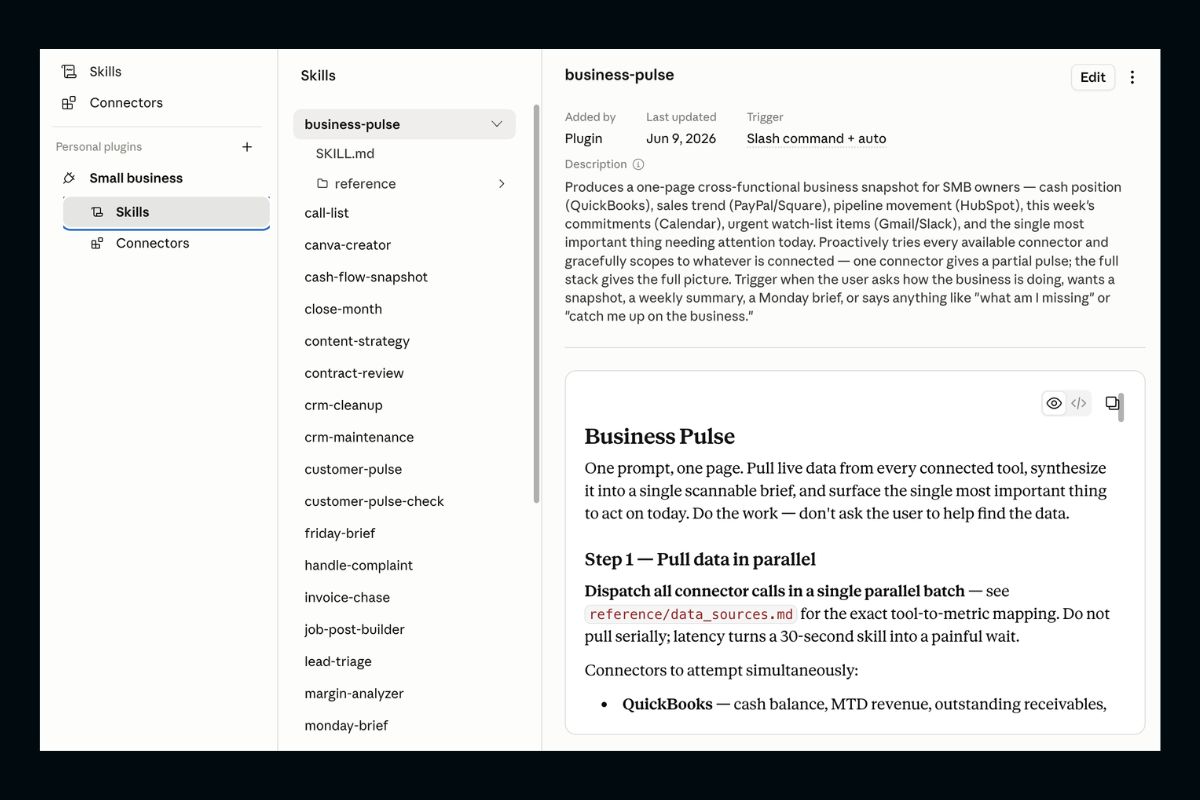
One of the biggest advantages is that setup is designed to be simple.
Step 1: Install Claude Cowork
Start by downloading and installing Claude Cowork on your computer.
Once installed, open the application.
Inside the interface, you will typically see three operating modes:
- Chat
- Cowork
- Code
Select Cowork mode.
This mode is where business workflows and plugin tools are managed.
Step 2: Open Customize
Navigate to the Customize section.
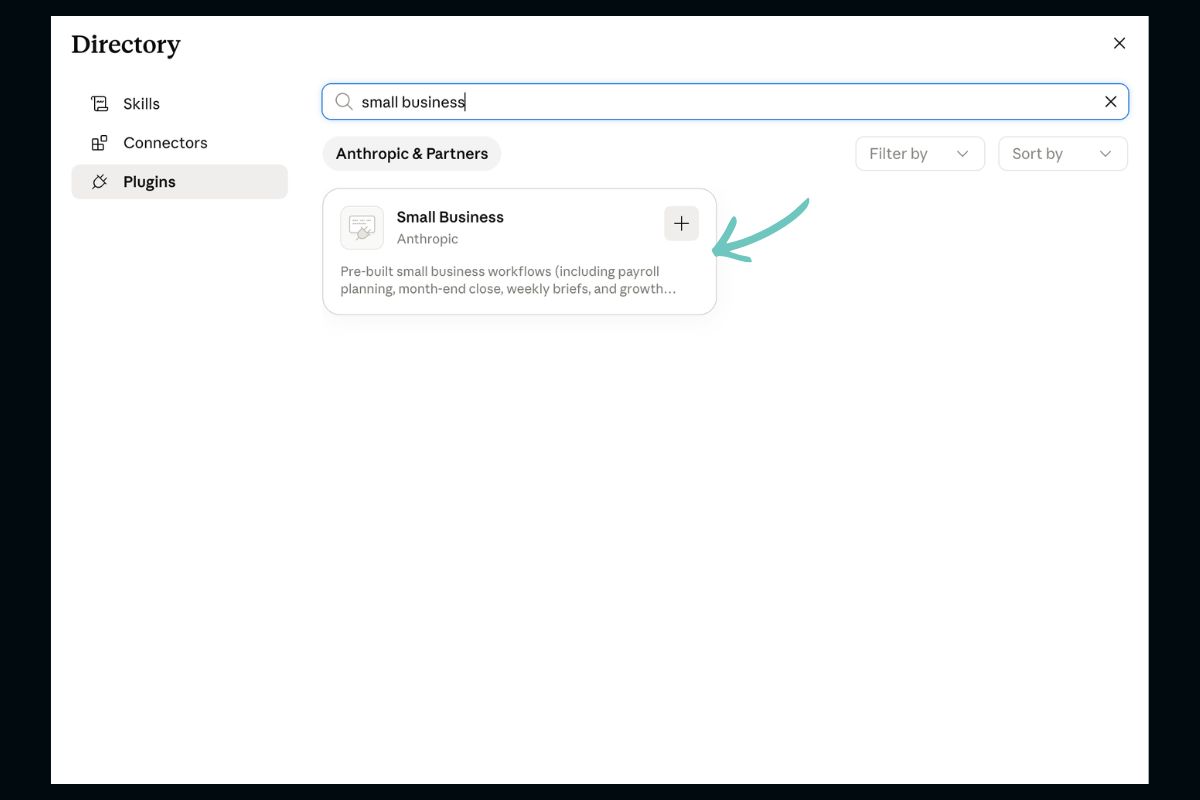
Inside Customize, you will see available plugins that can be installed.
Scroll through the available options until you find Small Business.
Click install.
Once completed, the plugin becomes available in your workspace.
Step 3: Review Available Skills
After installation:
- Open the Small Business plugin
- Select See All
- Browse the available skills
You do not need to use all 31 workflows.
That is usually where people get overwhelmed.
Instead:
Choose one repetitive task you already perform manually.
Start there.
Connecting Your Existing Apps
The real value comes from connectors.
Inside Customize, open Connectors and connect the platforms your business already uses.
Typical integrations may include:
- QuickBooks
- Slack
- Gmail
- PayPal
- Google Calendar
- Stripe
Connecting usually follows this process:
- Select the application
- Click Install
- Log into your account
- Approve permissions
- Confirm connection
Once connected, Claude can use information from those systems while still following permission controls.
The more tools you connect, the more context Claude receives.
More context usually leads to stronger outputs. This idea is especially important when looking at communication and outreach. Connecting email platforms and customer systems allows AI to identify patterns and improve efficiency over time, similar to the lessons covered in our article about 18 million emails sent and what that data revealed about business communication.
Why QuickBooks Is One of the Most Useful Integrations
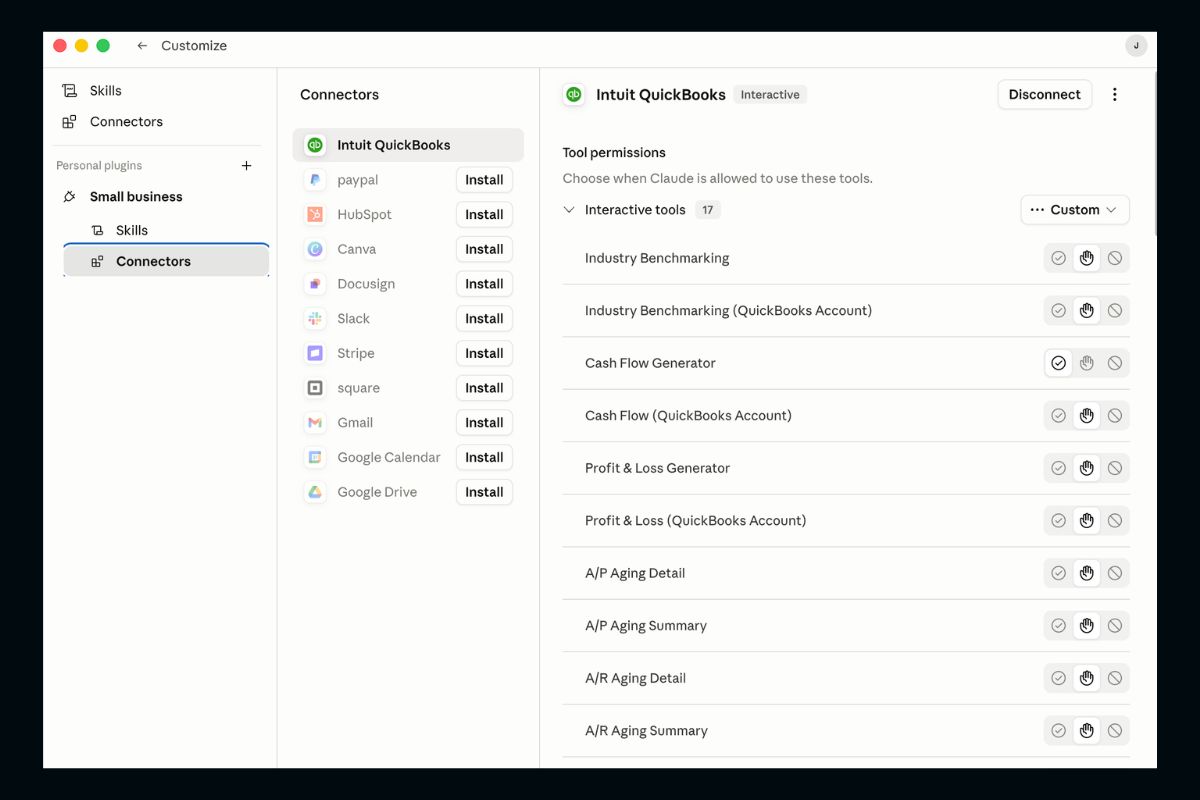
For many small businesses, QuickBooks may end up becoming the most valuable connector inside Claude’s Small Business Plugin Pack.
QuickBooks already acts as the financial hub for many companies by storing day to day operational data in one place. That includes:
- Revenue and sales activity
- Business expenses
- Customer invoices
- Payroll information
- Tax related records
- Financial reporting
- Cash flow tracking
- Customer and vendor information
Normally, turning all of that information into something useful means logging into QuickBooks, opening multiple reports, filtering data, and manually piecing together answers.
When QuickBooks is connected to Claude, that process becomes much more conversational.
Instead of searching through dashboards, business owners can ask questions in plain language and receive summaries, explanations, and next step recommendations based on the data available in QuickBooks.
Examples include:
- Which invoices are overdue and need follow up?
- What does my expected cash position look like next month?
- Which customers have outstanding balances?
- What products or services generate the strongest margins?
- Summarize this month’s financial performance
- Identify unusual spending trends
- Show revenue changes compared to last quarter
The connector can also help reduce repetitive administrative work.
For example, rather than exporting reports and building summaries manually, Claude can pull relevant financial information from connected accounts and organize it into a more digestible overview for review.
This can be especially useful for:
- Weekly business check ins
- Month end preparation
- Invoice follow up
- Financial planning conversations
- Reviewing operating performance
Another practical advantage is context.
Because Claude can work alongside information from other connected tools such as calendars, email, payment platforms, and communication apps, financial insights become more useful than standalone accounting reports.
For example, if sales slow down while invoice collections are delayed, Claude may help surface that pattern earlier and highlight areas that deserve attention.
That said, QuickBooks and Claude should be viewed as decision support tools rather than replacements for accountants or financial advisors. Business owners still review outputs and make final decisions, especially for bookkeeping, tax filing, payroll, and financial compliance.
For smaller teams without dedicated finance departments, this combination can make financial information easier to access and faster to act on.
Examples of Small Business Skills
The plugin includes practical workflows that support daily operations.
Business Pulse
Creates a quick snapshot of business performance.
This workflow can pull information across connected systems and identify the most important thing to focus on today.
Invoice Chase
Automatically prepares follow ups for unpaid invoices.
This can help improve cash collection without manually checking records.
Monday Brief
Creates a weekly planning summary.
Useful for reviewing priorities and preparing the week ahead.
Payroll Planning
Helps organize payroll schedules and preparation.
Job Post Builder
Generates hiring materials including:
- Job descriptions
- Interview guides
- Offer letters
Canva Creator
Supports marketing campaigns and content creation.
Claude can guide users through prompts and generate materials more efficiently. For businesses focused on lead generation and marketing, AI workflows can also complement broader digital strategies. If you are exploring automation alongside advertising, our article on Facebook ads and how things have changed explains how modern tools are reshaping campaign performance and content creation.
How to Start Without Getting Overwhelmed
The temptation with automation is trying to transform everything immediately.
That usually creates frustration.
A better approach is:
- Pick one repetitive task
- Test the workflow
- Refine the process
- Add another workflow later
This gradual approach is similar to how businesses improve other growth processes over time. Whether you are adopting AI or refining your targeted buyer outreach, small improvements tend to produce stronger long term results than trying to overhaul everything at once.
Good candidates include:
- Weekly reporting
- Invoice reminders
- Payroll planning
- Marketing content
- Meeting summaries
Tasks involving relationships, negotiations, leadership decisions, and judgment still benefit from human involvement.
AI works best as support rather than replacement.
Should Small Businesses Use It?
Claude’s Small Business Plugin Pack is not trying to replace employees or business owners.
Its goal is to reduce repetitive work.
Businesses that already operate with software like QuickBooks, Slack, Gmail, and Canva may see immediate benefits because their systems already contain useful business context.
For companies exploring AI but unsure where to begin, starting with one connected workflow can be a practical first step.
Small improvements repeated every week often create bigger operational gains than attempting a complete transformation all at once.
Getting Started with Claude for Small Business
Claude’s Small Business Plugin Pack makes AI feel more practical for everyday business operations.
Rather than generating content in isolation, it connects to the systems businesses already rely on and helps complete meaningful work.
The QuickBooks integration stands out because it turns financial information into simple, actionable insights without spending hours inside spreadsheets.
For business owners who want to explore AI without building complicated automations, starting with one workflow and one connector may be enough to begin seeing value.